How to solve issue when PowerPivot for Excel crashes on all workbooks
User Rating: 2 / 5


Today I noticed that at all PowerPivot workbooks on my machine started to crash on opening.
When I opened workbook with PowerPivot few seconds later I saw that SQLDumper.exe started with message:
unable to open file \\?\c:\Program Files\Microsoft Analysis Services\AS OLEDB\10\FlightRecorderCurrent.trc, error2
Then I saw another error message popup:
Microsoft PowerPivot Engine has stopped working
And then final error:
Unable to load the Vertipaq engine============================
Error Message:
============================
External component has thrown an exception.
============================
Call Stack:
============================
Server stack trace:
at System.Windows.Forms.Control.MarshaledInvoke(Control caller, Delegate method, Object[] args, Boolean synchronous)
at System.Windows.Forms.Control.Invoke(Delegate method, Object[] args)
at Microsoft.AnalysisServices.Modeler.FieldList.GeminiProxy.MethodInvokeCallBack(String memberName, String dispID, BindingFlags flags, Object[] args, Boolean ignoreRetry)
at Microsoft.AnalysisServices.Modeler.FieldList.GeminiProxy.HandleMethodInvoke(IMethodCallMessage callMessage)Exception rethrown at [0]:
at System.Runtime.Remoting.Proxies.RealProxy.HandleReturnMessage(IMessage reqMsg, IMessage retMsg)
at System.Runtime.Remoting.Proxies.RealProxy.PrivateInvoke(MessageData& msgData, Int32 type)
at Microsoft.Office.Interop.Excel.OLEDBConnection.Reconnect()
at Microsoft.AnalysisServices.Modeler.FieldList.InProcServer.LoadOLEDBConnection(Boolean raiseCompleteEvent)
============================
I had few things happen to my PC since I was able to work with my PowerPivot workbooks without problems:
- My machine has SQL Server 2005 AND SQL Server 2008R2 tools installed. Last week I applied SQL Server 2005 SP4 and then SQL Server 2008R2 SP1 on this machine.
- I updated Office 2010 with latest service pack.
Solution
I was able to fix this problem by simply un-installing PowerPivot and then installing it again.
More details
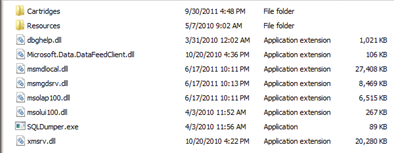
It appears that applying SQL Server service packs and/or Office services packs replaced some PowerPivot files. Here is the screenshot of the folder c:\Program Files\Microsoft Analysis Services\AS OLEDB\10
And here is the screenshot of the same folder after I reinstalled PowerPivot:
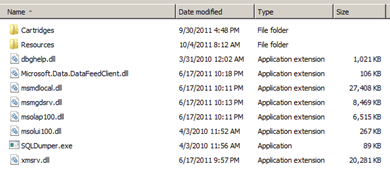
As you can see, files Microsoft.Data.DataFeedClient.dll and xmsrv.dll have different timestamp and I suspect that was causing PowerPivot corruption issue.